1 Nginx

1.1 安装

1
2
3
4
5
6
7
8
9
10
11
12
13
14
15
16
17
18
yum -y install yum-utils
vim /etc/yum.repos.d/nginx.repo
[nginx-stable]
name=nginx stable repo
baseurl=http://nginx.org/packages/centos/$releasever/$basearch/
gpgcheck=1
enabled=1
gpgkey=https://nginx.org/keys/nginx_signing.key
module_hotfixes=true

[nginx-mainline]
name=nginx mainline repo
baseurl=http://nginx.org/packages/mainline/centos/$releasever/$basearch/
gpgcheck=1
enabled=0
gpgkey=https://nginx.org/keys/nginx_signing.key
module_hotfixes=true
yum -y install nginx

1.2 配置

1
2
3
4
5
6
7
8
9
10
11
12
13
14
15
16
17
18
19
20
21
22
vim /etc/nginx/nginx.conf
map "$time_iso8601 # $msec" $time_iso8601_ms { "~(^[^+]+)(\+[0-9:]+) # \d+\.(\d+)$" $1.$3$2; }
log_format main
'{"timestamp":"$time_iso8601_ms",'
'"server_ip":"$server_addr",'
'"remote_ip":"$remote_addr",'
'"xff":"$http_x_forwarded_for",'
'"remote_user":"$remote_user",'
'"domain":"$host",'
'"url":"$request_uri",'
'"referer":"$http_referer",'
'"upstreamtime":"$upstream_response_time",'
'"responsetime":"$request_time",'
'"request_method":"$request_method",'
'"status":"$status",'
'"response_length":"$bytes_sent",'
'"request_length":"$request_length",'
'"protocol":"$server_protocol",'
'"upstreamhost":"$upstream_addr",'
'"http_user_agent":"$http_user_agent"'
'}';

2 Clickhouse

2.1 准备配置文件

1
2
3
4
5
6
7
8
9
10
11
12
13
14
15
16
17
18
19
20
21
22
23
cat >> docker-compose.yml <<EOF
services:
clickhouse:
image: clickhouse:25.6
container_name: clickhouse
network_mode: host
restart: always
expose:
- "8123"
- "9000"
volumes:
#- ./config/docker_related_config.xml:/etc/clickhouse-server/config.d/docker_related_config.xml:rw
#- ./config/config.xml:/etc/clickhouse-server/config.xml:rw
#- ./config/users.xml:/etc/clickhouse-server/users.xml:rw
- /etc/localtime:/etc/localtime:ro
- ./log:/var/log/clickhouse-server
- ./data:/var/lib/clickhouse/:rw
EOF
mkdir config
docker cp clickhouse:/etc/clickhouse-server/config.xml ./config
docker cp clickhouse:/etc/clickhouse-server/users.xml ./config
docker cp clickhouse:/etc/clickhouse-server/config.d/docker_related_config.xml ./config

2.2 关闭监听地址

1
2
3
4
5
# 第3行如下:
vim config/docker_related_config.xml
<clickhouse>
<!-- Listen wildcard address to allow accepting connections from other containers and host network. -->
<!-- listen_host>::</listen_host -->

2.3 配置主文件

1
2
3
4
5
6
7
8
9
10
11
12
13
14
15
16
17
18
19
20
21
22
23
24
cat >> config/config.xml <<EOF
<clickhouse replace="true">
<logger>
<level>debug</level>
<log>/var/log/clickhouse-server/clickhouse-server.log</log>
<errorlog>/var/log/clickhouse-server/clickhouse-server.err.log</errorlog>
<size>1000M</size>
<count>3</count>
</logger>
<display_name>ch_accesslog</display_name>
<listen_host>0.0.0.0</listen_host>
<http_port>8123</http_port>
<tcp_port>9000</tcp_port>
<user_directories>
<users_xml>
<path>users.xml</path>
</users_xml>
<local_directory>
<path>/var/lib/clickhouse/access/</path>
</local_directory>
</user_directories>
</clickhouse>

EOF

2.4 配置用户

这里我都配置一个密码了

1
2
3
4
5
6
7
8
9
10
11
12
13
14
15
16
17
18
19
20
21
22
23
24
25
26
27
28
29
30
31
32
33
34
35
36
37
38
39
40
41
42
43
44
45
46
47
48
49
50
51
52
53
54
#PASSWORD=$(base64 < /dev/urandom | head -c8); echo "$PASSWORD"; echo -n "$PASSWORD" | sha256sum | tr -d '-'
#9aiHCto/
#885551fc11e6ce714c2a947f0fb958945c84804c1cfcff575b67ea795ef357ef
#方便查看我没有加密,如果需要加密<password>1qaz@WSX</password>修改错下面这段
#<password_sha256_hex>885551fc11e6ce714c2a947f0fb958945c84804c1cfcff575b67ea795ef357ef</password_sha256_hex>

cat config/users.xml
<clickhouse>
<profiles>
<default>
</default>
<readonly>
<readonly>1</readonly>
</readonly>

</profiles>
<users>
<default>
<password>1qaz@WSX</password>
<networks>
<ip>::/0</ip>
</networks>
<profile>default</profile>
<quota>default</quota>
<access_management>1</access_management>
<named_collection_control>1</named_collection_control>
</default>
<nginx>
<password>1qaz@WSX</password>
<networks>
<ip>::/0</ip>
</networks>
<profile>default</profile>
<access_management>1</access_management>
<quota>default</quota>
<access_management>1</access_management>
<named_collection_control>1</named_collection_control>
</nginx>
</users>

<quotas>
<default>
<interval>
<duration>3600</duration>
<queries>0</queries>
<errors>0</errors>
<result_rows>0</result_rows>
<read_rows>0</read_rows>
<execution_time>0</execution_time>
</interval>
</default>
</quotas>
</clickhouse>

2.5 创建数据库

1
2
3
4
5
6
7
8
9
10
11
12
13
14
15
16
17
18
19
20
21
22
23
24
25
26
27
28
29
30
31
32
33
34
35
36
37
38
39
40
41
42
43
44
45
46
47
48
49
50
51
52
53
54
55
56
57
58
59
60
61
62
63
64
65
66
67
68
69
70
71
72
docker exec -it clickhouse clickhouse-client --user nginx --password 1qaz@WSX
ch_accesslog :)
CREATE DATABASE IF NOT EXISTS nginxlogs ENGINE=Atomic;

CREATE TABLE nginxlogs.nginx_access
(
`timestamp` DateTime64(3, 'Asia/Shanghai'),
`server_ip` String,
`domain` String,
`request_method` String,
`status` Int32,
`top_path` String,
`path` String,
`query` String,
`protocol` String,
`referer` String,
`upstreamhost` String,
`responsetime` Float32,
`upstreamtime` Float32,
`duration` Float32,
`request_length` Int32,
`response_length` Int32,
`client_ip` String,
`client_latitude` Float32,
`client_longitude` Float32,
`remote_user` String,
`remote_ip` String,
`xff` String,
`client_city` String,
`client_region` String,
`client_country` String,
`http_user_agent` String,
`client_browser_family` String,
`client_browser_major` String,
`client_os_family` String,
`client_os_major` String,
`client_device_brand` String,
`client_device_model` String,
`createdtime` DateTime64(3, 'Asia/Shanghai')
)
ENGINE = MergeTree
PARTITION BY toYYYYMMDD(timestamp)
PRIMARY KEY (timestamp,
server_ip,
status,
top_path,
domain,
upstreamhost,
client_ip,
remote_user,
request_method,
protocol,
responsetime,
upstreamtime,
duration,
request_length,
response_length,
path,
referer,
client_city,
client_region,
client_country,
client_browser_family,
client_browser_major,
client_os_family,
client_os_major,
client_device_brand,
client_device_model
)
TTL toDateTime(timestamp) + toIntervalDay(30)
SETTINGS index_granularity = 8192;

3 Grafana

3.1 安装插件

1
2
docker container exec -it grafana grafana cli plugins install grafana-clickhouse-datasource
docker restart grafana

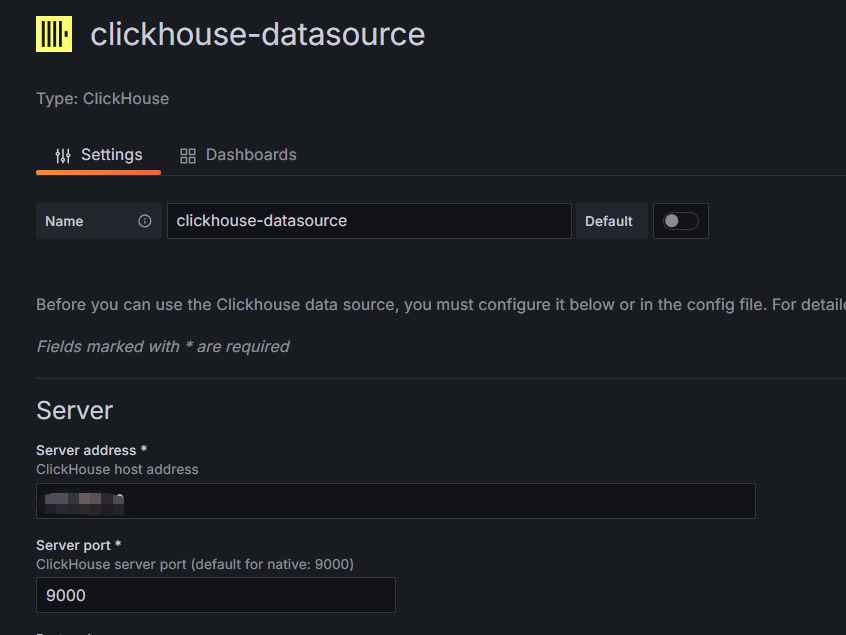
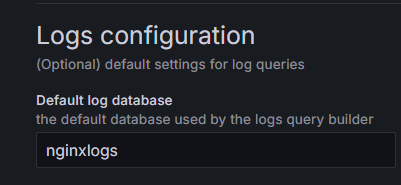
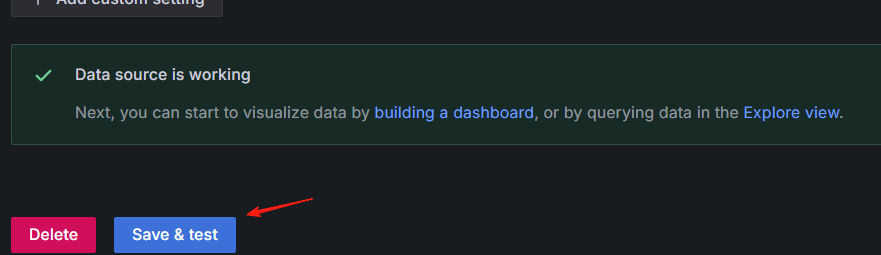
3.2 测试访问 Clickhouse

image.png

image.png
image.png

4 部署Vector采集日志

4.1 Vector部署

1
2
3
4
5
6
7
8
9
10
11
12
13
14
15
16
17
18
19
20
21
22
# 创建部署目录和docker-compose.yaml
mkdir -p /data/server/vector/conf
cd /data/server/vector
touch access_vector_error.log
wget https://raw.githubusercontent.com/P3TERX/GeoLite.mmdb/download/GeoLite2-City.mmdb
cat <<-EOF > docker-compose.yaml
services:
vector:
image: timberio/vector:0.48.X-alpine
container_name: vector
hostname: vector
restart: always
entrypoint: vector --config-dir /etc/vector/conf
ports:
- 8686:8686
volumes:
- /var/log/nginx:/nginx_logs # 这是需要采集的日志的路径需要挂载到容器内
- ./access_vector_error.log:/tmp/access_vector_error.log
- ./GeoLite2-City.mmdb:/etc/vector/GeoLite2-City.mmdb
- ./conf:/etc/vector/conf
- /etc/localtime:/etc/localtime
EOF

4.2 Vector配置

1
2
3
4
5
6
7
cd conf
cat <<-EOF > vector.yaml
timezone: "Asia/Shanghai"
api:
enabled: true
address: "0.0.0.0:8686"
EOF

4.2.1 Nginx 日志采集

1
2
3
4
5
6
7
8
9
10
11
12
13
14
15
16
17
18
19
20
21
22
23
24
25
26
27
28
29
30
31
32
33
34
35
36
37
38
39
40
41
42
43
44
45
46
47
48
49
50
51
52
53
54
55
56
57
58
59
60
61
62
63
64
65
66
67
68
69
70
vim nginx-access.yaml
sources:
01_file_nginx_access:
type: file
include:
- /nginx_logs/access.log #nginx请求日志路径
transforms:
02_parse_nginx_access:
drop_on_error: true
reroute_dropped: true
type: remap
inputs:
- 01_file_nginx_access
source: |
.message = string!(.message)
if contains(.message,"\\x") { .message = replace(.message, "\\x", "\\\\x") }
. = parse_json!(.message)
.createdtime = to_unix_timestamp(now(), unit: "milliseconds")
.timestamp = to_unix_timestamp(parse_timestamp!(.timestamp , format: "%+"), unit: "milliseconds")
.url_list = split!(.url, "?", 2)
.path = .url_list[0]
.query = .url_list[1]
.path_list = split!(.path, "/", 3)
if length(.path_list) > 2 {.top_path = join!(["/", .path_list[1]])} else {.top_path = "/"}
.duration = round(((to_float(.responsetime) ?? 0) - (to_float(.upstreamtime) ?? 0)) ?? 0,3)
if .xff == "-" { .xff = .remote_ip }
.client_ip = split!(.xff, ",", 2)[0]
.ua = parse_user_agent!(.http_user_agent , mode: "enriched")
.client_browser_family = .ua.browser.family
.client_browser_major = .ua.browser.major
.client_os_family = .ua.os.family
.client_os_major = .ua.os.major
.client_device_brand = .ua.device.brand
.client_device_model = .ua.device.model
.geoip = get_enrichment_table_record("geoip_table", {"ip": .client_ip}) ?? {"city_name":"unknown","region_name":"unknown","country_name":"unknown"}
.client_city = .geoip.city_name
.client_region = .geoip.region_name
.client_country = .geoip.country_name
.client_latitude = .geoip.latitude
.client_longitude = .geoip.longitude
del(.path_list)
del(.url_list)
del(.ua)
del(.geoip)
del(.url)
sinks:
03_ck_nginx_access:
type: clickhouse
inputs:
- 02_parse_nginx_access
endpoint: http://192.168.1.241:8123 #clickhouse http接口
database: nginxlogs #clickhouse 库
table: nginx_access #clickhouse 表
auth:
strategy: basic
user: nginx #clickhouse 用户
password: 1qaz@WSX #clickhouse 密码
compression: gzip
04_out_nginx_dropped:
type: file
inputs:
- 02_parse_nginx_access.dropped
path: /tmp/access_vector_error.log #解析异常的日志
encoding:
codec: json
enrichment_tables:
geoip_table:
path: "/etc/vector/GeoLite2-City.mmdb"
type: geoip
locale: "zh-CN"

5 Grafana Dashboards

NGINX请求日志分析看板 20241024 StarsL.cn | Grafana Labs
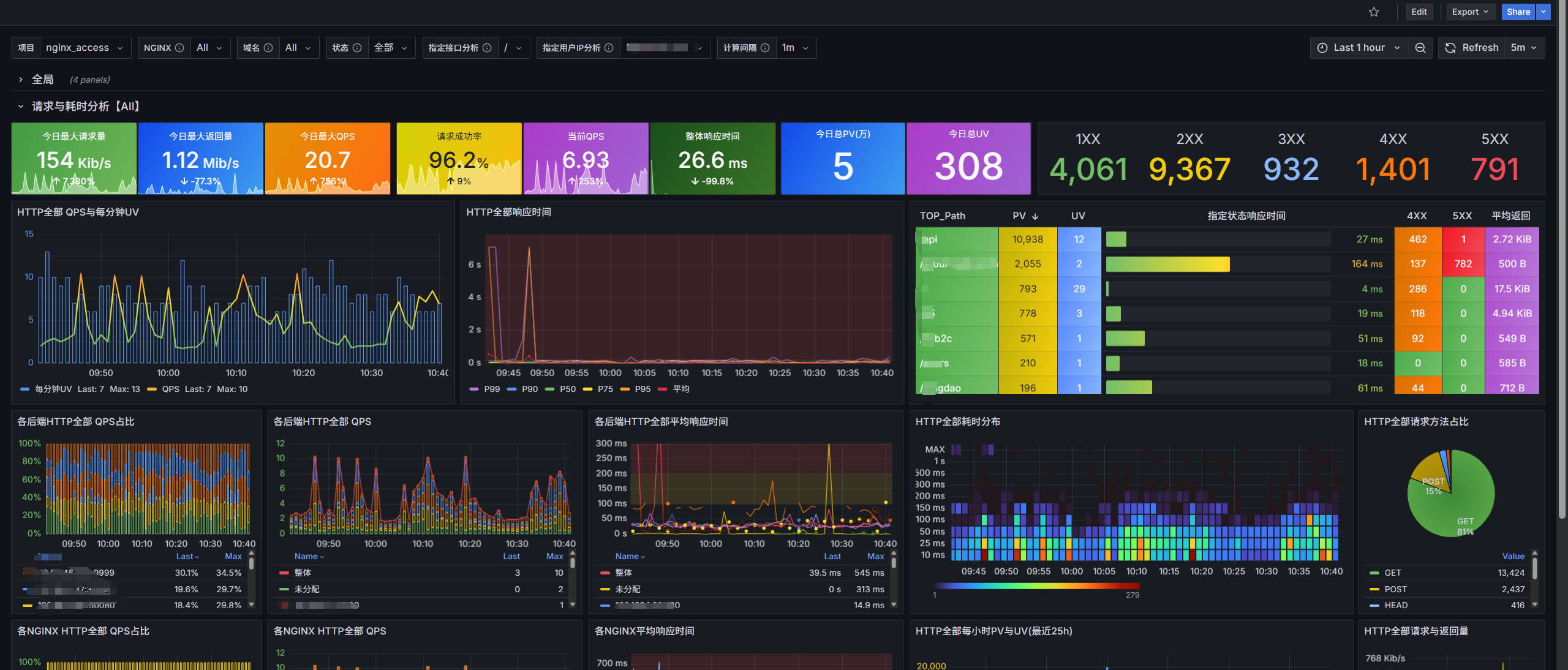
image.png

6 告警

Info

这里使用夜莺告警, 原理差不多, 主要是查询语句

6.1 分钟内 Xx 域名放过 500 次数

1
2
3
4
5
6
SELECT count() AS error_count
FROM nginxlogs.nginx_access
WHERE
status >= 500
AND domain = 'xx.ccops.cc'
AND timestamp >= now() - toIntervalMinute(5)

文章参考: 云原生日志平台:采集、可视化分析、监控 全实践