Attention
此文档根据[[通过 Ngnix 日志监控]]生成的日志进行防御, 如果用默认日志格式使用 CrowdSec 官方方案
1
2
3
4
curl -s https://install.crowdsec.net | sudo sh dnf install crowdsec dnf install crowdsec-firewall-bouncer-iptables
cscli parsers remove crowdsecurity/nginx-logs
1
2
3
4
5
6
7
8
9
10
11
12
13
14
15
16
17
18
19
20
21
22
23
24
25
26
27
28
29
30
31
32
33
34
35
36
37
38
39
40
41
42
43
44
45
46
47
48
49
50
51
52
53
54
55
56
57
58
59
60
61
62
63
64
65
66
67
68
69
70
71
72
73
74
75
76
77
78
79
80
81
cat /etc/crowdsec/parsers/s01-parse/nginx.yaml filter: "evt.Line.Labels.type == 'nginx'" onsuccess: next_stage name: crowdsecurity/nginx-logs description: "Parse nginx access and error logs" pattern_syntax: NGCUSTOMUSER: '[a-zA-Z0-9\.\@\-\+_%]+' NGCUSTOMURIPATH: "(?:/[A-Za-z0-9$.+!*'\\(\\)\\{\\},~:;=@\\#%&_\\-]*)+" NGCUSTOMURIPATHPARAM: '%{NGCUSTOMURIPATH}(?:%{URIPARAM})?' nodes: - filter: 'evt.Line.Raw matches "^{"' name: "nginx-json-access" statics: - meta: service value: "http" - meta: source_ip expression: JsonExtract(evt.Line.Raw, "remote_ip" ) - meta: http_status expression: JsonExtract(evt.Line.Raw, "status" ) - meta: http_path expression: JsonExtract(evt.Line.Raw, "url" ) - meta: http_verb expression: JsonExtract(evt.Line.Raw, "request_method" ) - meta: http_user_agent expression: JsonExtract(evt.Line.Raw, "http_user_agent" ) - meta: target_fqdn expression: JsonExtract(evt.Line.Raw, "domain" ) - target: evt.StrTime expression: JsonExtract(evt.Line.Raw, "timestamp" ) - meta: log_type value: http_access-log - grok: pattern: '(%{IPORHOST:target_fqdn} )?%{NGINXERRTIME:time} \[%{LOGLEVEL:loglevel}\] %{NONNEGINT:pid}#%{NONNEGINT:tid}: (\*%{NONNEGINT:cid} )?%{GREEDYDATA:message}, client: %{IPORHOST:remote_addr}, server: %{DATA:target_fqdn}, request: "%{WORD:verb} ([^/]+)?%{NGCUSTOMURIPATHPARAM:request}( HTTP/%{NUMBER:http_version})?", host: "%{IPORHOST}(:%{NONNEGINT})?"' apply_on: message statics: - meta: log_type value: http_error-log - target: evt.StrTime expression: evt.Parsed.time - meta: source_ip expression: "evt.Parsed.remote_addr" - meta: http_status expression: "evt.Parsed.status" - meta: http_path expression: "evt.Parsed.request" - meta: http_verb expression: "evt.Parsed.verb" - meta: log_type value: http_error-log pattern_syntax: NO_DOUBLE_QUOTE: '[^"]+' onsuccess: next_stage nodes: - filter: "evt.Parsed.message contains 'was not found in'" pattern_syntax: USER_NOT_FOUND: 'user "%{NO_DOUBLE_QUOTE:username}" was not found in "%{NO_DOUBLE_QUOTE}"' grok: pattern: '%{USER_NOT_FOUND}' apply_on: message statics: - meta: sub_type value: "auth_fail" - meta: username expression: evt.Parsed.username - filter: "evt.Parsed.message contains 'password mismatch'" pattern_syntax: PASSWORD_MISMATCH: 'user "%{NO_DOUBLE_QUOTE:username}": password mismatch' grok: pattern: '%{PASSWORD_MISMATCH}' apply_on: message statics: - meta: sub_type value: "auth_fail" - meta: username expression: evt.Parsed.username - filter: "evt.Parsed.message contains 'limiting requests, excess'" statics: - meta: sub_type value: "req_limit_exceeded"
systemctl restart crowdsec
1
2
3
4
5
6
7
8
9
10
11
12
13
14
15
cscli parsers list ────────────────────────────────────────────────────────────────────────────────────────────────────────────────────────────── PARSERS ────────────────────────────────────────────────────────────────────────────────────────────────────────────────────────────── Name 📦 Status Version Local Path ────────────────────────────────────────────────────────────────────────────────────────────────────────────────────────────── crowdsecurity/dateparse-enrich ✔️ enabled 0.2 /etc/crowdsec/parsers/s02-enrich/dateparse-enrich.yaml crowdsecurity/geoip-enrich ✔️ enabled 0.5 /etc/crowdsec/parsers/s02-enrich/geoip-enrich.yaml crowdsecurity/http-logs ✔️ enabled 1.3 /etc/crowdsec/parsers/s02-enrich/http-logs.yaml crowdsecurity/nginx-logs 🏠 enabled,local /etc/crowdsec/parsers/s01-parse/nginx.yaml crowdsecurity/public-dns-allowlist ✔️ enabled 0.1 /etc/crowdsec/parsers/s02-enrich/public-dns-allowlist.yaml crowdsecurity/sshd-logs ✔️ enabled 3.0 /etc/crowdsec/parsers/s01-parse/sshd-logs.yaml crowdsecurity/syslog-logs ✔️ enabled 0.8 /etc/crowdsec/parsers/s00-raw/syslog-logs.yaml crowdsecurity/whitelists ✔️ enabled 0.3 /etc/crowdsec/parsers/s02-enrich/whitelists.yaml ──────────────────────────────────────────────────────────────────────────────────────────────────────────────────────────────
Attention
官网文档写的不算详细, 这里看日志查看, 默认 http 测试 remediation: false 不做封禁做提醒
而且默认有白名单, 参考 [[#4.5 查看白名单]]
1 2 3 4 5 6 7 8 9 10 11 12 <html> <head ><title>404 Not Found</title></head> <body> <center><h1>404 Not Found</h1></center> <hr><center>nginx</center> </body> </html> time ="2025-08-19T11:24:46+08:00" level=info msg="Ip 192.168.10.69 performed 'crowdsecurity/http-generic-test' (1 events over 0s) at 2025-08-19 03:24:46.08421494 +0000 UTC" time ="2025-08-19T11:24:46+08:00" level=info msg="(46b3cee0c8f44000bdf64a4361ef27cdhIHcI4Rh4SBtD4zE/crowdsec) crowdsecurity/http-generic-test by ip 192.168.10.69 : 4h ban on Ip 192.168.10.69"
1
2
3
4
5
6
7
8
ab -c 300 -n 30000 http://registry.ccops.cc/ cscli decisions list ╭───────┬──────────┬──────────────────┬────────────────────────────────────────┬────────┬─────────┬────┬────────┬────────────┬──────────╮ │ ID │ Source │ Scope:Value │ Reason │ Action │ Country │ AS │ Events │ expiration │ Alert ID │ ├───────┼──────────┼──────────────────┼────────────────────────────────────────┼────────┼─────────┼────┼────────┼────────────┼──────────┤ │ 14997 │ crowdsec │ Ip:192.168.10.68 │ crowdsecurity/nginx-req-limit-exceeded │ ban │ │ │ 6 │ 3h58m23s │ 3 │ ╰───────┴──────────┴──────────────────┴────────────────────────────────────────┴────────┴─────────┴────┴────────┴────────────┴──────────╯
Info
1
2
3
4
5
6
7
8
9
10
11
12
13
ssh 192.168.10.69 root@192.168.10.69's password: Permission denied, please try again. root@192.168.10.69' s password: cscli decisions list ╭────────┬──────────┬──────────────────┬─────────────────────────────────┬────────┬─────────┬────┬────────┬────────────┬──────────╮ │ ID │ Source │ Scope:Value │ Reason │ Action │ Country │ AS │ Events │ expiration │ Alert ID │ ├────────┼──────────┼──────────────────┼─────────────────────────────────┼────────┼─────────┼────┼────────┼────────────┼──────────┤ │ 824994 │ crowdsec │ Ip:192.168.10.67 │ crowdsecurity/ssh-bf │ ban │ │ │ 7 │ 3h59m8s │ 71 │ │ 824993 │ crowdsec │ Ip:192.168.10.69 │ crowdsecurity/http-generic-test │ ban │ │ │ 1 │ 3h57m33s │ 70 │ ╰────────┴──────────┴──────────────────┴─────────────────────────────────┴────────┴─────────┴────┴────────┴────────────┴──────────╯
Info
1 2 3 4 5 6 7 8 9 10 11 12 13 14 15 16 17 18 19 20 cscli metrics show acquisition ╭──────────────────────────────────────────────────────────────────────────────────────────────────────────────────────────╮ │ Acquisition Metrics │ ├────────────────────────────────┬────────────┬──────────────┬────────────────┬────────────────────────┬───────────────────┤ │ Source │ Lines read │ Lines parsed │ Lines unparsed │ Lines poured to bucket │ Lines whitelisted │ ├────────────────────────────────┼────────────┼──────────────┼────────────────┼────────────────────────┼───────────────────┤ │ file:/var/log/messages │ 374 │ - │ 374 │ - │ - │ │ file:/var/log/nginx/access.log │ 8 │ 8 │ - │ 1 │ - │ │ file:/var/log/nginx/error.log │ 8 │ 8 │ - │ - │ - │ │ file:/var/log/secure │ 4 │ - │ 4 │ - │ - │ ╰────────────────────────────────┴────────────┴──────────────┴────────────────┴────────────────────────┴───────────────────╯ cscli decisions list ╭────────┬──────────┬──────────────────┬────────────────────────────────────────┬────────┬─────────┬────┬────────┬────────────┬──────────╮ │ ID │ Source │ Scope:Value │ Reason │ Action │ Country │ AS │ Events │ expiration │ Alert ID │ ├────────┼──────────┼──────────────────┼────────────────────────────────────────┼────────┼─────────┼────┼────────┼────────────┼──────────┤ │ 689992 │ crowdsec │ Ip:192.168.2.2 │ crowdsecurity/http-generic-test │ ban │ │ │ 1 │ 3h30m5s │ 60 │ │ 689991 │ crowdsec │ Ip:192.168.10.68 │ crowdsecurity/nginx-req-limit-exceeded │ ban │ │ │ 6 │ 3h10m27s │ 55 │ ╰────────┴──────────┴──────────────────┴────────────────────────────────────────┴────────┴─────────┴────┴────────┴────────────┴──────────╯
Faq
1
2
3
4
5
6
7
vim /etc/crowdsec/acquis.yaml filenames: - /var/log/nginx/error.log - /var/log/nginx/access.log labels: type : nginx
Info
能解析, 但是不生效
1
2
3
4
5
6
7
8
9
10
11
12
13
14
15
16
tail -n 1 /var/log/nginx/access.log | cscli explain -f- --type nginx -vline: {"timestamp" :"2025-08-19T11:17:01.466+08:00" ,"server_ip" :"192.168.10.69" ,"remote_ip" :"192.168.2.2" ,"xff" :"-" ,"remote_user" :"-" ,"domain" :"192.168.10.69" ,"url" :"/favicon.ico" ,"referer" :"http://192.168.10.69/" ,"upstreamtime" :"-" ,"responsetime" :"0.000" ,"request_method" :"GET" ,"status" :"404" ,"response_length" :"696" ,"request_length" :"417" ,"protocol" :"HTTP/1.1" ,"upstreamhost" :"-" ,"http_user_agent" :"Mozilla/5.0 (Windows NT 10.0; Win64; x64) AppleWebKit/537.36 (KHTML, like Gecko) Chrome/139.0.0.0 Safari/537.36 Edg/139.0.0.0" } ...... ├ s01-parse | └ 🟢 crowdsecurity/nginx-logs (+8 ~2) | └ update evt.Stage : s01-parse -> s02-enrich | └ update evt.StrTime : -> 2025-08-19T11:17:01.466+08:00 | └ create evt.Meta.http_verb : GET | └ create evt.Meta.service : http | └ create evt.Meta.target_fqdn : 192.168.10.69 | └ create evt.Meta.http_path : /favicon.ico | └ create evt.Meta.http_status : 404 | └ create evt.Meta.log_type : http_access-log | └ create evt.Meta.source_ip : 192.168.2.2 | └ create evt.Meta.http_user_agent : Mozilla/5.0 (Windows NT 10.0; Win64; x64) AppleWebKit/537.36 (KHTML, like Gecko) Chrome/139.0.0.0 Safari/537.36 Edg/139.0.0.0 ......
Check
tail -f /var/log/crowdsec.log 有日志没有任何报错的话查看规则, 与修复组件
1
2
3
4
5
6
7
8
9
10
11
12
13
14
15
16
17
vim /etc/crowdsec/scenarios/http-generic-test.yaml type : triggername: crowdsecurity/http-generic-test description: "Crowdsec Generic Test Scenario: basic HTTP trigger" filter: evt.Meta.log_type in ["http_access-log" , "http_error-log" ] and evt.Meta.http_path == "/crowdsec-test-NtktlJHV4TfBSK3wvlhiOBnl" blackhole: 5m groupby: "evt.Meta.source_ip" labels: confidence: 0 spoofable: 3 behavior: "http:test" label: "CrowdSec Generic Test Scenario" service: http remediation: false
Attention
1
2
3
4
5
6
7
8
9
10
11
12
13
14
15
16
17
18
19
20
21
22
23
24
25
26
27
28
29
30
31
32
33
34
cscli collections list ───────────────────────────────────────────────────────────────────────────────────────────────────────────────────────── COLLECTIONS ───────────────────────────────────────────────────────────────────────────────────────────────────────────────────────── Name 📦 Status Version Local Path ───────────────────────────────────────────────────────────────────────────────────────────────────────────────────────── crowdsecurity/base-http-scenarios ⚠️ enabled,tainted 1.2 /etc/crowdsec/collections/base-http-scenarios.yaml crowdsecurity/http-cve ✔️ enabled 2.9 /etc/crowdsec/collections/http-cve.yaml crowdsecurity/linux ✔️ enabled 0.3 /etc/crowdsec/collections/linux.yaml crowdsecurity/nginx ⚠️ enabled,tainted 0.2 /etc/crowdsec/collections/nginx.yaml crowdsecurity/sshd ✔️ enabled 0.7 /etc/crowdsec/collections/sshd.yaml crowdsecurity/whitelist-good-actors ✔️ enabled 0.2 /etc/crowdsec/collections/whitelist-good-actors.yaml ───────────────────────────────────────────────────────────────────────────────────────────────────────────────────────── cscli collections install crowdsecurity/nginx --force cscli collections list ───────────────────────────────────────────────────────────────────────────────────────────────────────────────── COLLECTIONS ───────────────────────────────────────────────────────────────────────────────────────────────────────────────── Name 📦 Status Version Local Path ───────────────────────────────────────────────────────────────────────────────────────────────────────────────── crowdsecurity/base-http-scenarios ✔️ enabled 1.2 /etc/crowdsec/collections/base-http-scenarios.yaml crowdsecurity/http-cve ✔️ enabled 2.9 /etc/crowdsec/collections/http-cve.yaml crowdsecurity/linux ✔️ enabled 0.3 /etc/crowdsec/collections/linux.yaml crowdsecurity/nginx ✔️ enabled 0.2 /etc/crowdsec/collections/nginx.yaml crowdsecurity/sshd ✔️ enabled 0.7 /etc/crowdsec/collections/sshd.yaml crowdsecurity/whitelist-good-actors ✔️ enabled 0.2 /etc/crowdsec/collections/whitelist-good-actors.yaml ───────────────────────────────────────────────────────────────────────────────────────────────────────────────── cscli scenarios list |grep test crowdsecurity/http-generic-test ✔️ enabled 0.2 /etc/crowdsec/scenarios/http-generic-test.yaml crowdsecurity/ssh-generic-test ✔️ enabled 0.2 /etc/crowdsec/scenarios/ssh-generic-test.yaml
Info
1
2
3
4
5
6
7
8
9
10
11
12
13
14
15
16
17
18
19
vim /etc/crowdsec/parsers/s02-enrich/whitelists.yaml name: crowdsecurity/whitelists description: "Whitelist events from private ipv4 addresses" whitelist: reason: "private ipv4/ipv6 ip/ranges" ip: - "::1" cidr: - "127.0.0.0/8" - "10.0.0.0/8" - "172.16.0.0/12" systemctl reload crowdsec tail -f /var/log/crowdsec.log ...... time="2025-08-21T10:30:03+08:00" level=info msg="Ip 192.168 .10 .100 performed 'crowdsecurity/http-generic-test' (1 events over 0s) at 2025-08-21 02:30:03.614720769 +0000 UTC" time="2025-08-21T10:30:03+08:00" level=info msg="(f3ae08a73a984eaa86ed2325bbae816dvIPsfAPcQL7VPmNo) alert : crowdsecurity/http-generic-test by ip 192.168 .10 .100 "
1
2
3
4
5
6
7
### 5.3 安装插件 ```bash # 解析器 cscli parsers install crowdsecurity/traefik-logs # 规则 cscli scenarios install aidalinfo/tcpudp-flood-traefik
1
2
3
4
filenames: - /data/server/traefik/logs/*.log labels: type : traefik
1
2
3
4
log : level: WARN format: json filePath: /logs/log.log
Attention
默认没有像 nginx 访问次数过得放到黑名单功能, 需要手动写
1
2
3
4
5
6
rateLimit: average: 200 burst: 400 period: 1m sourceCriterion: ipStrategy: {}
Info
参考 nginx-req-limit-exceeded 修改, 5 分钟内出现 10 次 429 就会把 ip 拉进黑名单
1
2
3
4
5
6
7
8
9
10
11
12
13
14
15
16
17
18
19
20
21
22
vim /etc/crowdsec/scenarios/http-too-many-429.yaml type : triggername: crowdsecurity/http-too-many-429 description: "Trigger when too many HTTP 429 responses are detected from an IP" filter: > evt.Meta.log_type in ["http_access-log" , "http_error-log" ] and evt.Meta.http_status == "429" blackhole: 5m groupby: "evt.Meta.source_ip" capacity: 10 leak_speed: "5m" labels: confidence: 2 spoofable: 3 behavior: "http:too_many_429" label: "HTTP Abuse - Too many 429 responses" service: http remediation: true systemctl reload crowdsec cscli scenarios list |grep 429 crowdsecurity/http-too-many-429 🏠 enabled,local /etc/crowdsec/scenarios/http-too-many-429.yaml
1 2 3 4 5 6 7 8 time ="2025-08-21T11:24:20+08:00" level=info msg="Ip 58.58.46.222 performed 'crowdsecurity/http-generic-test' (1 events over 0s) at 2025-08-21 03:24:20.155108373 +0000 UTC" time ="2025-08-21T11:24:20+08:00" level=info msg="(baf616cd5658442f8ee0e8b9bf75b504EnzI0rjx9lA2AwQN) alert : crowdsecurity/http-generic-test by ip 58.58.46.222 (CN/4134)" time ="2025-08-21T11:24:22+08:00" level=info msg="Signal push: 1 signals to push" time ="2025-08-21T13:36:33+08:00" level=info msg="Ip 58.58.46.222 performed 'crowdsecurity/http-too-many-429' (11 events over 120.80587ms) at 2025-08-21 05:36:33.286411245 +0000 UTC" time ="2025-08-21T13:36:33+08:00" level=info msg="(baf616cd5658442f8ee0e8b9bf75b504EnzI0rjx9lA2AwQN/crowdsec) crowdsecurity/http-too-many-429 by ip 58.58.46.222 (CN/4134) : 4h ban on Ip 58.58.46.222"
Attention
1
2
3
4
5
6
7
8
vim /etc/crowdsec/config.yaml prometheus: enabled: true level: aggregated listen_addr: 192.168.10.102 listen_port: 6060 systemctl restart crowdsec
dashboards获取
Abstract
参考文档
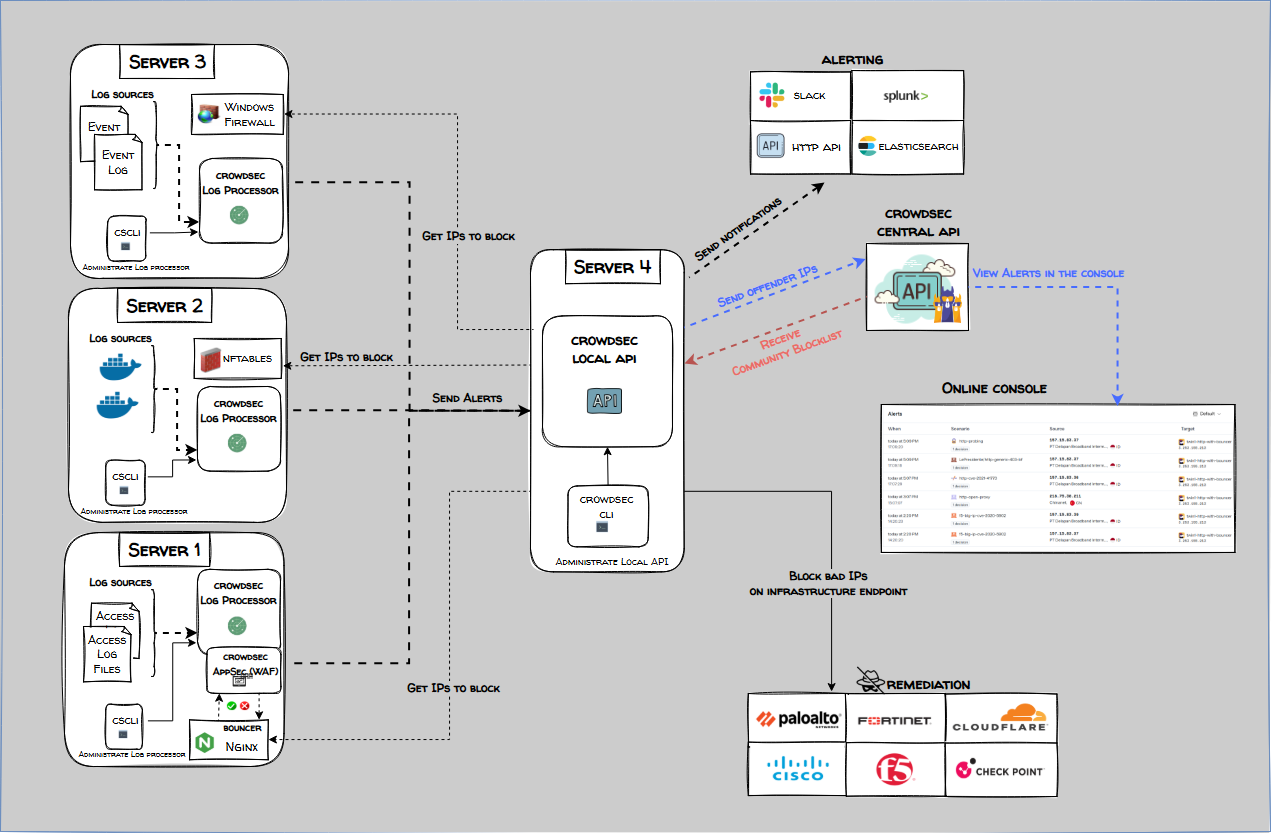
此文档使用一个完整安装的 CrowdSec 节点读取其中一个节点 nginx 日志, 然后把规则下发到别的节点 bouncer
完整安装的 CrowdSec负责处理日志,分析日志内容,根据安全场景规则进行匹配,并将生成的警报发送给本地API,Bouncer 会查询LAPI,获取需要执行的防护决策
1
2
3
4
5
6
7
8
9
10
11
12
13
14
vim /etc/crowdsec/config.yaml api: server: log_level: info listen_uri: 192.168.10.102:8080 auto_registration: enabled: true token: "VEcdkTmx00BqVChVYd7z165RD1vrPEFoUr27A19IXXFK893vtI6Kk6lI9rgBFUa8" allowed_ranges: - 192.168.10.0.0/24 vim /etc/crowdsec/local_api_credentials.yaml url: http://192.168.10.102:8080
删除默认的bouncers
1
2
3
4
5
6
cscli bouncers list Name IP Address Valid Last API pull ────────────────────────────────────────────────────────────────────────────────── cs-firewall-bouncer-1755741169 127.0.0.1 ✔️ 2025-08-21T06:36:13Z crowdsec-firewall-bouncer cscli bouncers remove cs-firewall-bouncer-1755741169
添加新的bouncers, 记得记录 token
1
2
3
4
5
6
7
8
9
10
11
$ cscli bouncers add testnouncer-69 API key for 'testnouncer-69' : PSp7V0zNR1QTa/kMF6c+9RCob7N5g50D08li4BsDIHI Please keep this key since you will not be able to retrieve it! $ cscli bouncers add testnouncer-70 API key for 'testnouncer-70' : AxZBJ1l9vxqZMXTxQDAvba7I/QjvNCCxXyt+dwaia30
每个节点配置 api 与 token
1 2 3 4 5 6 7 8 9 dnf -y install crowdsec-firewall-bouncer-iptables vim /etc/crowdsec/bouncers/crowdsec-firewall-bouncer.yaml api_url: http://192.168.10.102:8080/ api_key: PSp7V0zNR1QTa/kMF6c+9RCob7N5g50D08li4BsDIHI systemctl restart crowdsec-firewall-bouncer
查看bouncers, 这里加入两个bouncers
1
2
3
4
5
6
7
cscli bouncers list ────────────────────────────────────────────────────────────────────────────────────────── Name IP Address Valid Last API pull Type ────────────────────────────────────────────────────────────────────────────────────────── testnouncer-69 192.168.10.69 ✔️ 2025-08-25T02:10:52Z crowdsec-firewall-bouncer testnouncer-70 192.168.10.70 ✔️ 2025-08-25T02:10:45Z crowdsec-firewall-bouncer ──────────────────────────────────────────────────────────────────────────────────────────
1 2 3 4 5 6 7 8 9 10 11 12 13 14 15 16 17 18 19 20 21 22 23 24 25 26 cscli decisions list ╭────────┬──────────┬──────────────────┬────────────────────────────────────────┬────────┬─────────┬────┬────────┬────────────┬──────────╮ │ ID │ Source │ Scope:Value │ Reason │ Action │ Country │ AS │ Events │ expiration │ Alert ID │ ├────────┼──────────┼──────────────────┼────────────────────────────────────────┼────────┼─────────┼────┼────────┼────────────┼──────────┤ │ 705002 │ crowdsec │ Ip:192.168.10.68 │ crowdsecurity/nginx-req-limit-exceeded │ ban │ │ │ 6 │ 3h41m24s │ 54 │ ╰────────┴──────────┴──────────────────┴────────────────────────────────────────┴────────┴─────────┴────┴────────┴────────────┴──────────╯ iptables -L CROWDSEC_CHAIN -n Chain CROWDSEC_CHAIN (1 references) target prot opt source destination DROP 0 -- 0.0.0.0/0 0.0.0.0/0 match-set crowdsec-blacklists-1 src /* CrowdSec: crowdsec */ DROP 0 -- 0.0.0.0/0 0.0.0.0/0 match-set crowdsec-blacklists-0 src /* CrowdSec: CAPI */ ipset list crowdsec-blacklists-1 Name: crowdsec-blacklists-1 Type: hash :net Revision: 7 Header: family inet hashsize 1024 maxelem 131072 timeout 300 bucketsize 12 initval 0x6c14caa6 Size in memory: 536 References: 1 Number of entries: 1 Members: 192.168.10.68 timeout 13188